MyPatterns1.0.49
Publisher Description



[Abundant Embroidery Patterns]
Plant / People / Totem / Sport / Festival .....We provides various embroidery patterns for different categories. People can find what they want and enjoy the lovely designs.
[Friendly UI]
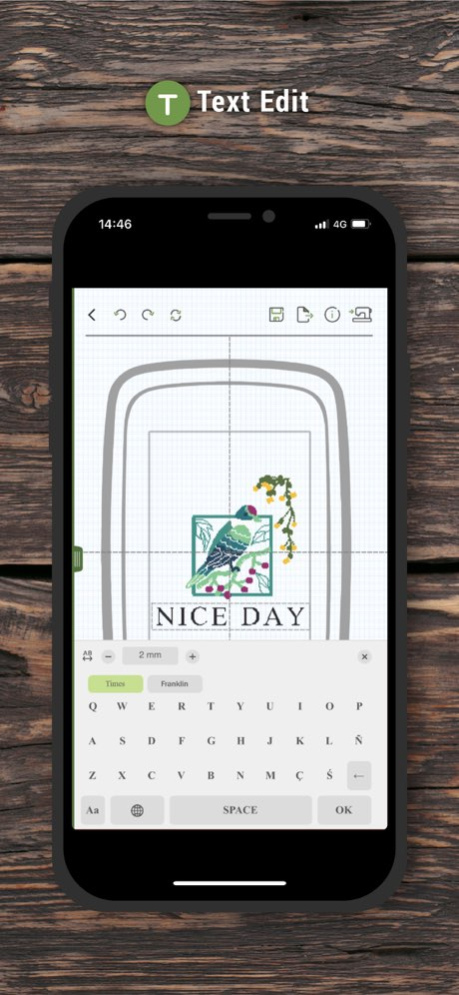
Forget about the small and unclear screen on your machine. Now you can use your mobile device (cellphone/pads) to create your own patterns with more flexibility. We also provides basic tools for users to customize the patterns for their own demands.
[Wi-Fi support]
With Wi-Fi connection, you can monitor the current embroidering progress without keeping sitting in front of your machine. It notifies the users the remaining time for embroidering and the current status.
[Editing Tools]
MyPatterns provides a series of tools to allow users to import other embroidery files, change the thread color, rotate the patterns without limitation and a lot more.
Version History Improve UI layout 1.0.49 Jun 9 Improve connection flow 1.0.44 Mar 24 Add language settings 1.0.38 11/14/2025 Fix bug with edit function. 1.0.11 09/17/2020 1.Builtin embroidery path optimization.
2.Add new settings switch of text zoom in limitation.
3.Optimization of some functions operation. 1.0.9 06/12/2020 version 1.0.6
- user Tip : access location permission 1.0.6 11/04/2019 - new function for importing embroidery file
- add new embroidery thread data
- add Numeric Keypad for jumping to the special stitch 1.0.5 04/22/2019 - add log message
- add restart function after finished current embroidery
- add disconnect function
- new struct for the instructions 1.0.4 12/21/2018 1.0.3 11/02/2018
About MyPatterns
The company that develops MyPatterns is Zeng Hsing Industrial Co., Ltd.. The latest version released by its developer is 1.0.49.
To install MyPatterns on your iOS device, just click the green Continue To App button above to start the installation process. The app is listed on our website since 2026-10-14 and was downloaded 69 times. We have already checked if the download link is safe, however for your own protection we recommend that you scan the downloaded app with your antivirus. Your antivirus may detect the MyPatterns as malware if the download link is broken.
How to install MyPatterns on your iOS device:
- Click on the Continue To App button on our website. This will redirect you to the App Store.
- Once the MyPatterns is shown in the iTunes listing of your iOS device, you can start its download and installation. Tap on the GET button to the right of the app to start downloading it.
- If you are not logged-in the iOS appstore app, you'll be prompted for your your Apple ID and/or password.
- After MyPatterns is downloaded, you'll see an INSTALL button to the right. Tap on it to start the actual installation of the iOS app.
- Once installation is finished you can tap on the OPEN button to start it. Its icon will also be added to your device home screen.
Program Details
System requirements
Download information
Pricing
Version History
version 1.0.49
posted on 2026-10-14
Version History Improve UI layout 1.0.49 Jun 9 Improve connection flow 1.0.44 Mar 24 Add language settings 1.0.38 11/14/2025 Fix bug with edit function. 1.0.11 09/17/2020 1.Builtin embroidery path optimization.
2.Add new settings switch of text zoom in limitation.
3.Optimization of some functions operation. 1.0.9 06/12/2020 version 1.0.6
- user Tip : access location permission 1.0.6 11/04/2019 - new function for importing embroidery file
- add new embroidery thread data
- add Numeric Keypad for jumping to the special stitch 1.0.5 04/22/2019 - add log message
- add restart function after finished current embroidery
- add disconnect function
- new struct for the instructions 1.0.4 12/21/2018 1.0.3 11/02/2018
version 1.0.44
posted on 2026-06-03
Version History Improve connection flow 1.0.44 Mar 24 Add language settings 1.0.38 11/14/2025 Fix bug with edit function. 1.0.11 09/17/2020 1.Builtin embroidery path optimization.
2.Add new settings switch of text zoom in limitation.
3.Optimization of some functions operation. 1.0.9 06/12/2020 version 1.0.6
- user Tip : access location permission 1.0.6 11/04/2019 - new function for importing embroidery file
- add new embroidery thread data
- add Numeric Keypad for jumping to the special stitch 1.0.5 04/22/2019 - add log message
- add restart function after finished current embroidery
- add disconnect function
- new struct for the instructions 1.0.4 12/21/2018 1.0.3 11/02/2018
version 1.0.44
posted on 2026-03-24
Improve connection flow
version 1.0.38
posted on 2025-11-14
Add language settings
version 1.0.11
posted on 2020-09-17
Sep 17, 2020
Version 1.0.11
Fix bug with edit function.
